
You’ll want a travel iPad that balances size, weight, battery, and power, so pick from five great choices: the 11-inch iPad with A16 for solid speed and full-size viewing, the renewed 10.2-inch for budget-friendly simplicity, the iPad mini 6 for pocketable speed and big storage, the iPad Air M3 for laptop-class performance and accessory support, and the iPad mini A17 Pro for top-tier chip and compactness; keep a slim folio, tempered glass, and 20–30W PD charger packed and you’ll be set to learn more.
| Apple iPad 11-inch (A16 128GB) — Silver |

| Best All-Rounder | Chip: A16 | Display size: 11‑inch Liquid Retina | Storage: 128GB (base; up to 512GB) | VIEW LATEST PRICE | Read Our Analysis |
| Apple iPad 10.2-Inch Wi-Fi 32GB Space Gray (Renewed) |

| Budget-Friendly Pick | Chip: A10 Fusion | Display size: 10.2‑inch (LCD) | Storage: 32GB | VIEW LATEST PRICE | Read Our Analysis |
| Apple iPad mini (6th Gen) 256GB Wi‑Fi Starlight |
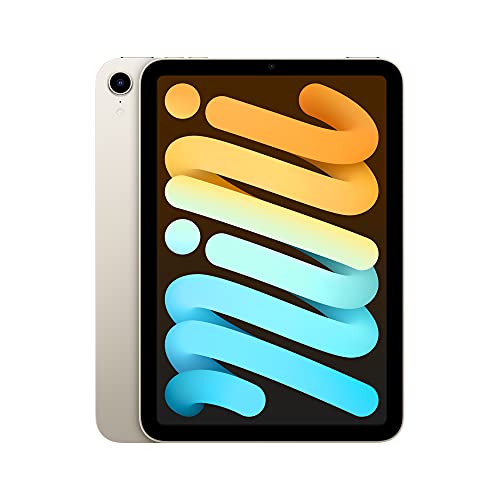
| Compact Powerhouse | Chip: A15 Bionic | Display size: 8.3‑inch Liquid Retina | Storage: 64GB or 256GB | VIEW LATEST PRICE | Read Our Analysis |
| Apple iPad Air 11″ M3 128GB Starlight |

| Professional Traveler | Chip: M3 | Display size: 11‑inch Liquid Retina | Storage: 128GB (options up to 1TB) | VIEW LATEST PRICE | Read Our Analysis |
| Apple iPad mini (A17 Pro) 128GB Wi‑Fi Purple |

| Performance Pocket Rocket | Chip: A17 Pro | Display size: 8.3‑inch Liquid Retina | Storage: 128GB | VIEW LATEST PRICE | Read Our Analysis |
More Details on Our Top Picks
Apple iPad 11-inch (A16 128GB) — Silver
If you travel a lot and want a powerful, lightweight device that keeps up with everything you do on the road, the Apple iPad 11-inch with the A16 chip is a smart pick. You’ll get superfast performance for games, photo and video editing, and juggling apps. The 11-inch Liquid Retina display with True Tone makes screens easy on your eyes in different light. Wi‑Fi 6 and USB‑C keep transfers quick and simple. The 12MP cameras handle video calls, 4K clips, and scans, while Touch ID secures payments. iPadOS plus Pencil and Magic Keyboard options make work and play smooth.
- Chip:A16
- Display size:11‑inch Liquid Retina
- Storage:128GB (base; up to 512GB)
- Front camera:12MP Center Stage
- Connector / Ports:USB‑C
- Biometric unlock:Touch ID (top button)
- Additional Feature:Magic Keyboard Folio compatible
- Additional Feature:True Tone display
- Additional Feature:All-day battery life
Apple iPad 10.2-Inch Wi-Fi 32GB Space Gray (Renewed)
You’ll appreciate how this renewed 10.2-inch iPad fits into travel life, especially when you want a reliable, lightweight device that still handles everyday tasks. You’ll hold a 1.06 pound tablet that slips into bags without fuss. It runs on an A10 Fusion chip with 3 GB RAM, so apps load smoothly and videos play well. The 32 GB storage keeps essential files, and Wi‑Fi 802.11ac keeps you connected in cafes and airports. You’ll like the Touch ID, stereo speakers, and 10-hour battery for long transit days. Being renewed, it’s budget friendly and kind to the planet.
- Chip:A10 Fusion
- Display size:10.2‑inch (LCD)
- Storage:32GB
- Front camera:8MP (rear noted; front unspecified—model has front FaceTime camera)
- Connector / Ports:Lightning connector
- Biometric unlock:Touch ID / Home button
- Additional Feature:Smart Connector present
- Additional Feature:3.5 mm headphone jack
- Additional Feature:Renewed condition available
Apple iPad mini (6th Gen) 256GB Wi‑Fi Starlight
The iPad mini (6th Gen) 256GB in Starlight is the best choice for travelers who want a full iPad experience in one hand, especially when you need something light, fast, and reliable on the go. You’ll love the 8.3-inch Liquid Retina display with True Tone and P3 color for bright photos and easy reading. The A15 Bionic chip gives smooth apps and fast graphics, while 256GB stores more media. You get USB-C for simple charging, Touch ID for quick security, and Apple Pencil 2 support for notes. Front Center Stage and a 12MP back camera cover video and 4K needs.
- Chip:A15 Bionic
- Display size:8.3‑inch Liquid Retina
- Storage:64GB or 256GB
- Front camera:12MP Ultra Wide with Center Stage
- Connector / Ports:USB‑C
- Biometric unlock:Touch ID (top button)
- Additional Feature:One‑hand portability
- Additional Feature:Apple Pencil (2nd gen) support
- Additional Feature:Ultralow reflectivity display
Apple iPad Air 11″ M3 128GB Starlight
Pick the iPad Air 11 M3 if you want a light yet powerful travel companion that keeps up with work, creativity, and fun without weighing you down. You’ll enjoy the M3 chip that handles photo edits, games, and many apps without hiccups. The 11-inch Liquid Retina display shows bright colors and low glare, and it works well with Apple Pencil and Magic Keyboard for notes or edits. You get 128GB storage and options if you need more, plus all-day battery life for long trips. Fast Wi‑Fi 6E, USB-C, Touch ID, and solid cameras make travel easier and safer.
- Chip:M3
- Display size:11‑inch Liquid Retina
- Storage:128GB (options up to 1TB)
- Front camera:12MP Center Stage
- Connector / Ports:USB‑C
- Biometric unlock:Touch ID (top button)
- Additional Feature:Stage Manager support
- Additional Feature:Wi‑Fi 6E connectivity
- Additional Feature:Magic Keyboard trackpad compatible
Apple iPad mini (A17 Pro) 128GB Wi‑Fi Purple
If you want a travel tablet that feels light in your bag but still handles heavy tasks, the iPad mini A17 Pro is a smart pick. You’ll love its 8.3-inch Liquid Retina display for watching videos and editing photos with vivid P3 color and True Tone. It fits in small bags but packs A17 Pro power for fast apps and graphics. You can use Apple Pencil Pro or USB‑C Pencil for notes and markup. The 12MP cameras handle video calls and scans, while Wi‑Fi 6E and USB‑C move large files quickly. Touch ID keeps things secure and simple.
- Chip:A17 Pro
- Display size:8.3‑inch Liquid Retina
- Storage:128GB
- Front camera:12MP Ultra Wide with Center Stage
- Connector / Ports:USB‑C
- Biometric unlock:Touch ID (top button)
- Additional Feature:Apple Pencil Pro compatible
- Additional Feature:Wi‑Fi 6E connectivity
- Additional Feature:Color: Purple
Factors to Consider When Choosing an iPad for Traveling
When you pick an iPad for travel, think about size and portability so it fits your bag and feels light on long journeys. You’ll want strong battery life and enough performance for your apps, plus storage that won’t fill up and connectivity that keeps you online. Together these factors help you choose a device that’s comfortable, reliable, and ready for whatever your trip brings.
Size And Portability
Because you’ll be carrying your iPad more than you think, size and weight matter a lot for travel comfort and convenience. Pick a screen size that balances viewing comfort and packability. Smaller tablets under about 9 inches slide into tiny bags and coat pockets. If you watch shows or work, 10 to 11 inches give more space without too much bulk. Pay attention to weight. Devices under 500 grams feel easier to hold on long flights and cut down arm strain. Check thickness and overall dimensions so it fits your travel case or airplane pouch. If you type or draw, choose a compact model that still supports a keyboard or stylus and stays slim enough for lap use. Note thinner designs can run warmer and have smaller batteries.
Battery Life Considerations
Usually you want an iPad that can last the day without hunting for an outlet, so battery life should be one of your top checks before you buy. Look for advertised all-day claims or specific runtimes like 10+ hours of mixed use to feel confident on long travel days. Remember real use cuts runtime—bright screens, cellular or Wi‑Fi, GPS navigation, and streaming can shave 30 to 70 percent off estimates. Check charging options next, since USB‑C fast charging or higher-wattage support lets you top up quickly during layovers. Factor in accessory drain from keyboards, drives, Bluetooth headphones, and tethering, and bring a compact charger or power bank. Finally, manage background refresh and avoid full discharges to keep battery health longer.
Performance Needs
If you want your iPad to keep up with travel life, pick hardware that matches the apps and tasks you actually use so you won’t be stuck waiting for things to load. Think about the processor and GPU as the engine and transmission. If you stream, edit photos, or play games, choose a recent multi-core chip with solid graphics so apps feel instant. Also aim for 4 to 6 GB of RAM or more to keep multiple apps and tabs open without constant reloading. Pay attention to sustained performance and cooling for long editing or gaming sessions so the device won’t slow down. Finally, balance raw power with battery life by checking real-world endurance under your typical workload.
Storage And Expansion
When you travel with an iPad, storage and how you expand it become one of the most practical decisions you’ll make, because photos, apps, and videos eat space faster than you expect. Choose at least 128GB if you store high resolution photos, 4K video, or large apps, since those files fill up quickly. If you shoot or edit video on the road, aim for 256GB or more to avoid constant offloading, because a minute of 4K can use 100 to 400 MB or more. Also check for external storage support via USB C or wireless drives so you can offload media without relying only on internal space. Use cloud backup and selective syncing, but plan for offline access and factor in system files that take 10 to 20 percent of capacity.
Connectivity Options
Pick the right connectivity and you’ll stop worrying about lost signals or slow file transfers on the road. When you travel, choose an iPad with Wi‑Fi 6 or 6E for faster, steadier hotspot and public network access and lower lag. If you need service away from Wi‑Fi, get a cellular model with 4G LTE or 5G plus an unlocked nano‑SIM or eSIM so you can swap local carriers and avoid roaming charges. Check the USB‑C or Lightning port specs for high data throughput and DisplayPort alternate mode if you plan to attach storage, external displays, or wired accessories. Look for dual‑band Wi‑Fi and WPA3 support to boost compatibility and security. Also pick Bluetooth 5.x for stable, low‑power connections to headphones and keyboards.
Camera And Media Capabilities
Bring your travel memories to life by choosing an iPad that handles photos, video, and editing without fuss. Pick a front camera with Center Stage or wide framing so your video calls and vlogs stay steady while you move. For shooting, choose a rear camera with at least 12MP and 4K video to keep details sharp for sharing and prints. You’ll want True Tone and P3 wide color so what you see while editing matches the final result. Plan storage wisely; 128GB or more feels safe, or get fast USB‑C transfers to offload big files. Finally, check stylus support, strong editing apps, and enough processing power to edit 4K clips without long waits.
Accessories And Durability
Even if you prefer packing light, don’t skimp on how you protect and power your iPad while traveling; a few smart accessories will save you time, money, and stress. Choose a lightweight, compact case that shields corners and screen while adding only 200 to 400 grams so your bag stays easy to carry. Prefer a folio or protective cover with a built in stand so you can watch hands free on planes and trains without juggling the device. Use a tempered glass or high grade PET screen protector to prevent scratches and keep touch responses smooth. Pack a PD charger rated 20 to 30W with a USB C or Lightning cable to top up fast. Include a microfiber cloth and a padded sleeve or shock absorbent pouch for extra peace of mind.
Frequently Asked Questions
How Durable Are These iPads Against Drops and Water Exposure?
They’re reasonably durable: you’ll get some drop resistance from reinforced frames and toughened glass, and water resistance on higher-end models, but you shouldn’t rely on them for heavy impacts or prolonged submersion. Replaceables help after damage.
Which iPad Has the Best Battery Longevity for Multi-Day Trips?
The iPad Pro 13-inch gives you the best battery longevity for multi-day trips; it’ll last longest under heavy use, especially with optimized settings, low-brightness, and background app management to stretch each charge across several days.
Are These Models Compatible With International Cellular Bands and eSIM?
“Birds of a feather flock together.” Yes, most recent iPad models support international cellular bands and eSIMs, but you’ll want to verify specific carrier compatibility and regional LTE/5G band support before traveling to make certain service in your destinations.
What Travel Accessories (Cases, Chargers) Are Recommended for Each Model?
You’ll want rugged folio cases for protection, slim keyboard cases for productivity, and waterproof sleeves for flights. Pack a GaN wall charger, USB-C PD cable, portable power bank, and a compact USB-C hub with HDMI and SD reader.
Which iPad Offers the Best Performance for Photo and Video Editing on the Go?
Think of a turbocharged studio: you’ll want the iPad Pro with M4 chip — it’s the fastest, handles ProRes and multitasking smoothly, and won’t bottleneck heavy RAW edits, color grading, or realtime effects while you’re traveling.