

You’ll want compact, reliable mice that tuck away receivers or pair via Bluetooth, save battery, and track well on trains, planes, and cafés. Try TECKNET for comfort and grips, Uiosmuph G12 for a slim rechargeable silent ride, HP X3000 G3 for 1600 DPI multi-surface tracking, Logitech M185 for long AA life and simple plug-and-play, and VssoPlor for a slim silent option. Each balances size, power management, and connectivity so you’ll stay productive—keep going to learn specifics.
| TECKNET Ergonomic Wireless Optical Mouse — Purple |

| Best Ergonomic Pick | Connectivity: 2.4 GHz wireless via USB-A receiver (receiver stored in mouse back) | Portability: Compact travel size (4.09 × 2.68 × 1.49 in) with receiver storage | Battery / Power Type: Replaceable AAA batteries (not included) | VIEW LATEST PRICE | Read Our Analysis |
| Uiosmuph G12 Slim Rechargeable Wireless Silent Mouse |
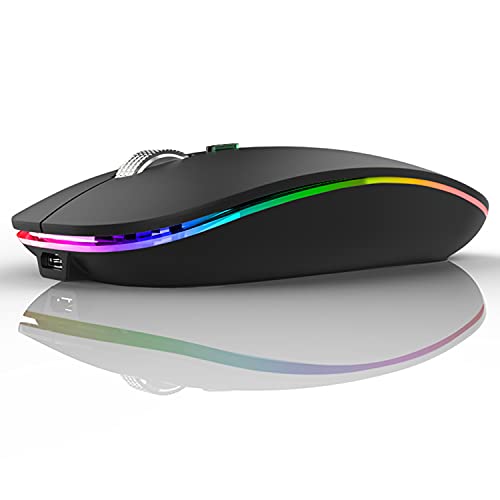
| Best Rechargeable Choice | Connectivity: 2.4 GHz wireless via USB-A receiver (receiver stored in mouse bottom) + USB-C adapter included | Portability: Slim, compact (4.4 × 2.2 × 0.79 in) fits laptop bags; receiver stored in mouse | Battery / Power Type: Built-in rechargeable battery (rechargeable) | VIEW LATEST PRICE | Read Our Analysis |
| HP X3000 G3 Wireless Mouse — 1600 DPI Travel-Friendly |

| Best Travel Classic | Connectivity: 2.4 GHz wireless via USB-A nano receiver (receiver stores inside mouse) | Portability: Travel-friendly size with internal receiver storage | Battery / Power Type: Single AA battery (replaceable) | VIEW LATEST PRICE | Read Our Analysis |
| Logitech M185 Wireless Mouse with USB Nano Receiver |

| Most Reliable Pick | Connectivity: 2.4 GHz wireless via USB-A nano receiver (receiver included) | Portability: Small, portable contoured design for tight workspaces | Battery / Power Type: Single AA battery (included) | VIEW LATEST PRICE | Read Our Analysis |
| VssoPlor 2.4G Wireless Silent Slim Mouse (Black/Gold) |

| Best Silent Slim Option | Connectivity: 2.4 GHz wireless via USB-A nano receiver (receiver stows inside mouse) | Portability: Slim, compact, lightweight form factor with receiver storage | Battery / Power Type: Battery-powered with intelligent sleep (implies replaceable battery) | VIEW LATEST PRICE | Read Our Analysis |
More Details on Our Top Picks
TECKNET Ergonomic Wireless Optical Mouse — Purple
If you travel with a laptop and want a mouse that’s small, comfy, and fuss-free, this TECKNET ergonomic wireless optical mouse is a smart pick. You’ll like the compact size that slips into a bag, with the tiny USB receiver stored in the back so you won’t lose it. The contoured shape and rubber side grips feel natural, and six buttons give you extra control. You can switch DPI across five levels to match speed and precision. It runs long on one AAA battery, sleeps to save power, and plugs in via USB-A for easy setup.
- Connectivity:2.4 GHz wireless via USB-A receiver (receiver stored in mouse back)
- Portability:Compact travel size (4.09 × 2.68 × 1.49 in) with receiver storage
- Battery / Power Type:Replaceable AAA batteries (not included)
- Silent / Quiet Operation:Not marketed as silent (standard click; side buttons noted)
- Multi‑OS Compatibility:Windows, Mac, Chrome OS, Linux (side button limited on Mac)
- Receiver Storage:Receiver stores in mouse back
- Additional Feature:Five adjustable DPI levels
- Additional Feature:Rubber side-grips
- Additional Feature:Six-button layout
Uiosmuph G12 Slim Rechargeable Wireless Silent Mouse
The Uiosmuph G12 Slim Rechargeable Wireless Silent Mouse is a great pick for frequent travelers who want a quiet, compact tool that just works. You’ll like its slim 4.4 x 2.2 x 0.79 inch body that slips into laptop bags without bulk. It uses a built in rechargeable battery, so you won’t hunt for replacements, and it enters sleep after eight minutes to save power. Buttons use a soundless design to cut click noise, while seven color LEDs add soothing, decorative light. A stored USB A receiver and USB C adapter keep connectivity easy across many laptops.
- Connectivity:2.4 GHz wireless via USB-A receiver (receiver stored in mouse bottom) + USB-C adapter included
- Portability:Slim, compact (4.4 × 2.2 × 0.79 in) fits laptop bags; receiver stored in mouse
- Battery / Power Type:Built-in rechargeable battery (rechargeable)
- Silent / Quiet Operation:Soundless left/right buttons (silent design)
- Multi‑OS Compatibility:Windows, Mac OS, Linux, Chrome OS (USB-C support examples noted)
- Receiver Storage:Receiver stored in mouse bottom (plus USB-C adapter)
- Additional Feature:Built-in rechargeable battery
- Additional Feature:7-color LED cycle
- Additional Feature:USB-C adapter included
HP X3000 G3 Wireless Mouse — 1600 DPI Travel-Friendly
You’ll appreciate the HP X3000 G3 when you need a simple, reliable mouse that fits your bag and your routine. You hold it and feel the contoured shape that supports long sessions without strain, and you can use either hand comfortably. It pairs via a tiny USB-A nano receiver that tucks inside the mouse, so you won’t lose it while traveling. The 1600 DPI optical sensor tracks precisely on many surfaces using LED multi-surface tech, and the 2.4 GHz connection reaches about 30 feet. One AA battery lasts up to 15 months, so you can travel worry free.
- Connectivity:2.4 GHz wireless via USB-A nano receiver (receiver stores inside mouse)
- Portability:Travel-friendly size with internal receiver storage
- Battery / Power Type:Single AA battery (replaceable)
- Silent / Quiet Operation:Standard click (not specified as silent)
- Multi‑OS Compatibility:Windows, Mac, Chromebook
- Receiver Storage:Nano receiver stores inside mouse
- Additional Feature:Ambidextrous design
- Additional Feature:LED multi-surface tech
- Additional Feature:Stores USB nano receiver
Logitech M185 Wireless Mouse with USB Nano Receiver
Perfect for travelers who want simple, reliable gear, the Logitech M185 fits easily into a laptop bag and feels natural in either hand. You’ll like its compact, contoured ambidextrous shape that works for right or left clicks. It uses a plug-and-play 2.4 GHz USB nano receiver so you get a steady connection up to 10 m without installing software. The 1000 DPI optical sensor gives smooth cursor control and a precise scroll wheel for fine work. You get up to 12 months of battery life with smart sleep, an AA included, recycled plastic parts, and a three-year warranty.
- Connectivity:2.4 GHz wireless via USB-A nano receiver (receiver included)
- Portability:Small, portable contoured design for tight workspaces
- Battery / Power Type:Single AA battery (included)
- Silent / Quiet Operation:Standard click (not specified as silent)
- Multi‑OS Compatibility:Windows, Mac, laptops (plug-and-play)
- Receiver Storage:Nano receiver provided/kept with mouse (typical internal storage)
- Additional Feature:3-year limited warranty
- Additional Feature:Uses AA battery (included)
- Additional Feature:Recycled-plastic components
VssoPlor 2.4G Wireless Silent Slim Mouse (Black/Gold)
If you want a travel mouse that stays quiet and saves battery, this slim VssoPlor model is a smart pick that won’t weigh down your bag. You’ll like the silent clicks that cut noise and help you stay focused in cafes or planes. The slim, frosted body feels nice and fits easily in your pocket alongside the stashed USB nano receiver. It uses a 2.4 GHz link for steady tracking up to 10 m and wakes with a click after auto sleep to save power. It works with older Windows and Mac systems and handles laptops, desktops, and travel use well.
- Connectivity:2.4 GHz wireless via USB-A nano receiver (receiver stows inside mouse)
- Portability:Slim, compact, lightweight form factor with receiver storage
- Battery / Power Type:Battery-powered with intelligent sleep (implies replaceable battery)
- Silent / Quiet Operation:Quiet / silent clicks (marketed as silent slim mouse)
- Multi‑OS Compatibility:Windows (7/8/10/XP/Vista), Mac OS X 10.4
- Receiver Storage:USB nano receiver stows inside mouse
- Additional Feature:Auto sleep after 5 minutes
- Additional Feature:2.4 GHz anti-interference
- Additional Feature:Smooth frosted surface
Factors to Consider When Choosing a Mouse for Traveling
When you pick a travel mouse, think about size and portability first so it fits your bag and your hand without fuss. You’ll want long battery life or a rechargeable option, plus clear wireless choices and a place to store the receiver or adapter so nothing gets lost. Also check how noisy the clicks are so you don’t disturb others while you work on the go.
Size And Portability
Because you carry a laptop, your mouse should be small enough to slip into a sleeve but still comfortable enough to use, and that balance is what makes size and portability so important for travel. Aim for a compact footprint around 4 to 4.5 inches long and under 2.5 inches wide so the mouse fits easily in sleeves and small bags. Choose a low profile about 0.7 to 1.5 inches thick to save space and avoid pressure on other items. Think about weight too, since lighter mice ease carry burden on frequent trips. Also check how the receiver stores, or pick Bluetooth to avoid losing a dongle. Finally, confirm the shape supports your grip, because small can mean less comfort during long use.
Battery Type And Life
You’ll often rely on the mouse’s battery to keep your workflow smooth on the road, so picking the right type and understanding its life matters more than you might think. You can choose rechargeable mice with built-in batteries, which free you from carrying spare cells, but remember they need charging and can die if you can’t find power. Or you can pick replaceable AA or AAA mice, which let you swap cells quickly and often last 12 to 24 months depending on use. Check power-saving features like auto-sleep and on/off switches because they stretch runtime. Also confirm estimated life and whether it’s measured in continuous use or standby. Finally, think about battery format availability in places you’ll travel.
Wireless Connectivity Options
Pick the connectivity that fits your gear and travel habits, and you’ll save time and stress on the road. You’ll choose between 2.4 GHz dongles, Bluetooth, or USB-C receivers. 2.4 GHz with a USB-A nano receiver gives steady low latency and decent range, but you must guard the tiny dongle. Bluetooth frees you from a dongle and plugs straight into most modern laptops and tablets, though pairing can take longer and old devices might not support it. USB-C receivers match new laptops but can add a small adapter that may block nearby ports. Think about crowded Wi-Fi and Bluetooth environments, since interference can cut range and responsiveness. Also weigh battery life differences, as Bluetooth often saves power while dongle mice may need more frequent charging.
Receiver Storage Or Adapter
After you pick a wireless type, think about how you’ll carry the receiver or adapter on the road. Choose a mouse with built-in receiver storage so the dongle locks into a slot and won’t wander in your bag. If your laptop uses only USB-C, check whether the tiny receiver works with a USB-C adapter or if the mouse pairs via Bluetooth instead. Tiny nano receivers that sit flush in a port are less likely to snag than bulky dongles. Avoid designs that rely on extra adapters you could forget. Look for magnetic or locking retention so the receiver stays connected while stored and survives jostling. If the receiver clips to the mouse body, you get less bulk and more peace of mind during travel.
Noise Level And Clicks
If you’re often working on planes, trains, or in quiet cafes, the noise your mouse makes matters more than you think, because a loud click can distract both you and nearby people. You’ll want a mouse with silent or quiet click buttons, since redesigned microswitches cut click volume by about 10 to 20 dB and feel noticeably softer. You can also choose touch or low-profile scissor and membrane buttons for even less mechanical noise, though they change tactile feedback. Think about extra buttons and a textured scroll wheel, because they add small sounds during use. Prefer rechargeable models with built-in batteries to avoid rattling and the fuss of swaps, and look for power-saving sleep modes to prevent accidental clicks while stowed.
Ergonomics For Travel
When you’re working on a cramped tray table or in a bumpy train seat, choosing a travel mouse that fits your hand makes all the difference to comfort and focus. Pick a compact contoured shape that supports your natural hand curve, so you won’t tire quickly on long trips. If you swap hands or face tight spaces, consider ambidextrous or small form designs to stay flexible. Favor rubberized side grips or textured shells to keep control when your environment is unstable. Also choose a lightweight model under about 100 to 120 g to save room in your bag while keeping tactile stability. Make sure left and right buttons plus a scroll wheel sit where your fingers rest, avoiding awkward reaches that cause strain.
Surface Compatibility
You’ve picked a comfortable travel mouse, and now you’ll want to make sure it actually works on the surfaces you’re likely to meet on the road. Start by checking whether the sensor is optical or laser and note the DPI range, for example 800 to 2600 DPI, so you know it will track on thin tray tables and uneven café wood. Look for explicit multi-surface claims and glass compatibility because many sensors fail on glossy or transparent surfaces. If you often use patterned or fabric-covered surfaces, consider models with advanced tracking or LED multi-surface capability. Also favor mice that keep steady sensitivity across small surface changes and offer an adjustable DPI or a dedicated surface-mode switch to avoid jitter and misalignment.
Multi‑OS Compatibility
Because you’ll likely move between laptops, tablets, and public machines while traveling, pick a mouse that works across every operating system you use so nothing stops your workflow. Check support for Windows, macOS, Chrome OS, and Linux before you buy. Also check whether special buttons or DPI switches need vendor drivers, since some features may not work on macOS or Chrome OS without software. Prefer plug-and-play Bluetooth or 2.4 GHz so you can connect quickly. Bluetooth often pairs with tablets and laptops without a receiver, while 2.4 GHz needs a USB-A dongle. If your devices use USB-C only, verify native USB-C receiver support or that the dongle works with a USB-C adapter. Finally choose multi-host pairing so you can flip between systems without re-pairing.