

Travelers seeking a compact printer for trips have six great options that balance size, battery life, media flexibility and print quality. The KODAK Step produces 2×3 glossy ZINK photos, while the Phomemo M08F handles fast black-and-white receipts.
An inkless thermal model provides wider-format printing with included rolls, and the Canon PIXMA TR160 offers borderless photos plus letter-size document printing. For full A4/Letter output on the road, the Phomemo M834 fits the bill, and the HP OfficeJet 250 adds mobile scanning and copying.
| KODAK Step Portable Instant Smartphone Photo Printer |
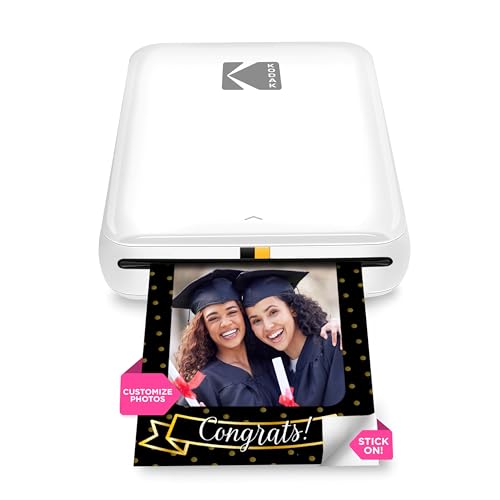
| Best for Photo Fans | Portability: Palm-sized, portable mini (2.39 oz) | Wireless Connectivity: Bluetooth and NFC (mobile app) | Mobile App Support: KODAK App (iOS & Android) with editing suite | VIEW LATEST PRICE | Read Our Analysis |
| Phomemo M08F Portable Wireless Thermal Bluetooth Printer |

| Best for On-the-Go Docs | Portability: Compact, lightweight (1.5 lb), fits bag/briefcase | Wireless Connectivity: Bluetooth (Phomemo app) | Mobile App Support: Phomemo app (iOS & Android) | VIEW LATEST PRICE | Read Our Analysis |
| Inkless Portable Wireless Thermal Printer with Carry Case |

| Best Compact Workhorse | Portability: Compact travel design (1.75 lb, 1.7″ thick) | Wireless Connectivity: Bluetooth (Jadens Printer app) | Mobile App Support: Jadens Printer app (iOS & Android) | VIEW LATEST PRICE | Read Our Analysis |
| Canon PIXMA TR160 Wireless Portable Printer with Display |

| Best for Color Prints | Portability: Lightweight, fits in bag/backpack | Wireless Connectivity: Wi‑Fi (Canon PRINT, AirPrint, Mopria) | Mobile App Support: Canon PRINT app (mobile) | VIEW LATEST PRICE | Read Our Analysis |
| Phomemo M834 Portable Bluetooth A4 Thermal Printer |

| Best for A4 Portability | Portability: Portable with carry case (designed for travel) | Wireless Connectivity: Bluetooth (smartphones) | Mobile App Support: Phomemo/compatible mobile app (Bluetooth printing) | VIEW LATEST PRICE | Read Our Analysis |
| HP OfficeJet 250 Wireless Mobile Printer Scanner Copier |

| Best All-in-One | Portability: Portable all‑in‑one, fits in car/backpack/briefcase | Wireless Connectivity: Wireless (HP Auto Wireless Connect, app) | Mobile App Support: HP App (print & scan from smartphone) | VIEW LATEST PRICE | Read Our Analysis |
More Details on Our Top Picks
KODAK Step Portable Instant Smartphone Photo Printer
If you’re a traveler who wants instant, stick-on snapshots you can share or scrap on the go, I’d point you to the KODAK Step—it’s a palm-sized, Bluetooth/NFC mini printer that spits out 2×3-inch ZINK photos without ink cartridges, so you can print anywhere from your phone and peel-and-stick the results into a travel journal or pass them around. I like its 24-bit color, 313×400 dpi, and glossy, water- and smudge-resistant prints. The KODAK App offers edits, stickers, and collages. It weighs under three ounces, charges via micro USB, holds ten sheets, and prints about 25 photos per battery charge.
- Portability:Palm-sized, portable mini (2.39 oz)
- Wireless Connectivity:Bluetooth and NFC (mobile app)
- Mobile App Support:KODAK App (iOS & Android) with editing suite
- Rechargeable Battery:Built‑in Li‑ion rechargeable battery (≈25 prints/charge)
- Inkless or Ink-Based Printing Technology:ZINK (zero‑ink dye crystal photo printing)
- Photo/Document Capability:2″ x 3″ color photo prints (sticky‑back)
- Additional Feature:Peel-and-stick prints
- Additional Feature:NFC pairing support
- Additional Feature:25-photo battery life
Phomemo M08F Portable Wireless Thermal Bluetooth Printer
I recommend the Phomemo M08F if you need a truly portable, no-fuss printer for travel — I can slip its 1.5 lb frame into a bag and print documents, receipts, or photos from my phone in seconds. Its compact thermal design delivers crisp black-and-white output without ink, using special thermal paper only. I connect via Bluetooth with the Phomemo app on iOS or Android, or use USB on a PC after downloading the driver. Setup’s quick, battery lasts for about 140 letter-sized prints, and it’s perfect for travelers, students, or anyone needing fast, reliable prints on the go.
- Portability:Compact, lightweight (1.5 lb), fits bag/briefcase
- Wireless Connectivity:Bluetooth (Phomemo app)
- Mobile App Support:Phomemo app (iOS & Android)
- Rechargeable Battery:Built‑in rechargeable battery (up to ~140 sheets per charge)
- Inkless or Ink-Based Printing Technology:Thermal (inkless black‑and‑white)
- Photo/Document Capability:Documents and images (black‑and‑white thermal prints)
- Additional Feature:Prints PDFs/Word/docs
- Additional Feature:USB PC driver support
- Additional Feature:Fast processing speed
Inkless Portable Wireless Thermal Printer with Carry Case
You’ll appreciate this inkless thermal printer if you travel often and need quick, mess-free prints on the go. I take it in a slim carry case that fits my backpack; at 1.75 lb and 1.7 in thick it’s genuinely portable. It uses inkless thermal tech and only Gloryang thermal paper—three rolls come included—so don’t expect to use regular or inkjet sheets. I pair it via Bluetooth with the Jadens Printer app on my phone, or install the driver for laptop use. It prints 2–8.5 in wide, handles photos, drawings, and text, and stores paper tidily inside.
- Portability:Compact travel design (1.75 lb, 1.7″ thick)
- Wireless Connectivity:Bluetooth (Jadens Printer app)
- Mobile App Support:Jadens Printer app (iOS & Android)
- Rechargeable Battery:Built‑in rechargeable battery (portable use)
- Inkless or Ink-Based Printing Technology:Thermal (inkless; requires Gloryang thermal paper)
- Photo/Document Capability:Photos, images, drawings, documents (2–8.5″ wide)
- Additional Feature:Includes 3 paper rolls
- Additional Feature:Built-in paper bin
- Additional Feature:Two paper loading methods
Canon PIXMA TR160 Wireless Portable Printer with Display
I’d recommend the Canon PIXMA TR160 for travelers who need a true on-the-go printer that slips into a bag yet handles both documents and photos. I like its lightweight build, 50-sheet tray, and ability to print up to 8.5″ x 11″. The 5-color hybrid ink delivers sharp black text and vivid color, including square and borderless photos. A 1.44″ monochrome OLED shows status and ink levels quickly. Setup is simple: Canon PRINT, Apple AirPrint, or Mopria, plus Wireless Direct and cloud printing when you need it. App-based workflows keep printing straightforward while traveling.
- Portability:Lightweight, fits in bag/backpack
- Wireless Connectivity:Wi‑Fi (Canon PRINT, AirPrint, Mopria)
- Mobile App Support:Canon PRINT app (mobile)
- Rechargeable Battery:Portable (battery-powered/portable-focused; quick ink checks)*
- Inkless or Ink-Based Printing Technology:Inkjet (5‑color hybrid ink system)
- Photo/Document Capability:Photos and documents up to 8.5″ x 11″ (color)
- Additional Feature:50-sheet paper tray
- Additional Feature:1.44″ OLED display
- Additional Feature:Borderless square prints
Phomemo M834 Portable Bluetooth A4 Thermal Printer
For travelers who need full‑page prints on the go, I recommend the Phomemo M834 for its A4/Letter compatibility and inkless 300 dpi thermal tech. I like that its 300 dpi thermal printing boosts clarity by about 60% and requires no ink, toner, or ribbons. It accepts five sizes (US Letter, A4, 4.33″, 3.14″, 2.08″) and three paper types, and ships with four rolls for immediate use. The 2600 mAh battery delivers over 160 pages per charge and outlasts rivals by roughly 116%. Bluetooth and USB support Android, iOS, Windows, Linux, ChromeOS, and macOS, plus a travel case.
- Portability:Portable with carry case (designed for travel)
- Wireless Connectivity:Bluetooth (smartphones)
- Mobile App Support:Phomemo/compatible mobile app (Bluetooth printing)
- Rechargeable Battery:2600 mAh rechargeable battery (160+ pages per charge)
- Inkless or Ink-Based Printing Technology:Thermal (inkless, 300 dpi)
- Photo/Document Capability:A4/Letter and other sizes (thermal, up to A4)
- Additional Feature:300 dpi resolution
- Additional Feature:Multiple paper sizes
- Additional Feature:2600 mAh battery
HP OfficeJet 250 Wireless Mobile Printer Scanner Copier
If you need a true on-the-go all‑in‑one, I recommend the HP OfficeJet 250 for travelers who print, scan, and copy from a car, hotel room, or client site. I like that it’s a full-featured AIO that fits in a backpack or briefcase and works with laptops, tablets, and smartphones. Setup’s simple with HP Auto Wireless Connect and you can print without a router or via the HP App. It includes a battery with fast charge (90 minutes when off) plus AC support. It handles common paper and photo sizes, uses HP 62 cartridges, and comes with a one-year warranty.
- Portability:Portable all‑in‑one, fits in car/backpack/briefcase
- Wireless Connectivity:Wireless (HP Auto Wireless Connect, app)
- Mobile App Support:HP App (print & scan from smartphone)
- Rechargeable Battery:Battery included (HP Fast Charge supported)
- Inkless or Ink-Based Printing Technology:Inkjet (uses Original HP ink cartridges)
- Photo/Document Capability:Prints photos and documents up to various sizes (including Letter, photos up to 8×10)
- Additional Feature:All-in-one (scan/copy)
- Additional Feature:Fast-charge battery
- Additional Feature:Supports photo sizes up to 8×10
Factors to Consider When Choosing a Portable Printer For Travel
Travelers should weigh size and weight first, since compact form factors ease portability without sacrificing durability. Battery life and connectivity options determine where and how reliably printing can occur on the go. Consider print technology and media compatibility to guarantee print quality and support for the paper types or labels needed.
Size And Weight
When selecting a portable printer, size and weight determine whether the device truly fits a traveler’s kit. Aim for printers under about 2 pounds (≈0.9 kg) to remain comfortable in a backpack or carry-on. Check dimensions: compact footprints roughly the size of a paperback (under 10 x 7 x 3 inches) slide into daypacks without overfilling them. Attention should be paid to protruding parts—paper trays and control panels—that increase packing complexity and risk snags. Assess total packed volume including paper rolls, cartridges, and any battery, since consumables can negate a small unit’s advantage. Prefer models with integrated carrying features, such as built-in handles or included travel cases, to reduce the need for separate protective accessories.
Battery Life
Weighing battery life is essential for portable printers aimed at travel: capacity (mAh), real-world page yield, and stated prints-per-charge provide different but complementary signals of endurance. Travelers should check battery capacity and translate mAh into expected page counts, noting portable units span a few hundred to several thousand mAh. Compare manufacturers’ prints-per-charge or runtime figures rather than relying solely on battery chemistry, since efficiency differs by model and print mode (color versus monochrome). Evaluate charging options and speeds—USB-C fast charging, car compatibility, and quick-charge features reduce downtime. Account for standby draw and boot-up delays, which erode usable life on multi-day trips. For extended operations, prefer swappable batteries or designs that run directly from a power bank to avoid dependence on AC.
Connectivity Options
Connected devices determine much of a portable printer’s usefulness on the road, so buyers should prioritize supported wireless protocols (Bluetooth, Wi‑Fi, NFC) and direct-print modes like Wi‑Fi Direct or hotspot that bypass local routers. The printer should explicitly list compatibility with iOS, Android, Windows and macOS, and note whether printing requires a proprietary mobile app or additional drivers. Wired alternatives—USB‑C or standard USB—serve dual roles for stable laptop connections and device charging when wireless is unreliable. Multi‑device support and the ability to maintain simultaneous connections matter for group travel or mixed-device workflows. Confirming these connectivity details before purchase prevents incompatibility problems and reduces setup time in transit, improving reliability and convenience.
Print Technology
In choosing a portable printer for travel, buyers should prioritize print technology because it dictates size, weight, maintenance, print quality, and ongoing supply needs. Thermal models use heat-sensitive paper and no ink or toner, yielding very lightweight, low-maintenance units ideal for receipts or simple monochrome prints. Dye-sublimation and ZINK-style photo printers produce color images without liquid ink by transferring dye or activating embedded crystals, offering smudge-resistant glossy results that suit casual photo printing. Inkjet portable printers deliver full-color, high-resolution output for photos and documents but require ink cartridges that add weight and necessitate carrying spares. Print resolution (dpi) and color depth determine detail and vibrancy; higher values approach true photo quality. Consider consumable compatibility and availability when evaluating long-term travel convenience.
Media Compatibility
Media compatibility determines what a portable printer can actually produce and how convenient it will be while traveling. Buyers should confirm support for intended paper sizes and formats—2″×3″ photo stickers, A4/Letter, or roll widths up to 8.5″—to avoid limitations on the road. Determine whether the unit uses specialized media (thermal paper, ZINK) versus standard inkjet or plain copy paper; specialized supplies may be scarce while traveling. Verify input/output capacities, including sheet tray limits and roll lengths, so media capacity aligns with expected print volume between resupplies. Check supported media types—stickers, cut sheets, rolls, envelopes—and maximum print widths for labels, receipts, photos, or full‑page documents. Finally, consider media durability options such as glossy, water‑resistant finishes or archival inks when prints need handling or long‑term storage.
Print Quality
After confirming what media a portable printer accepts and how long supplies will last on the road, buyers should assess print quality to guarantee outputs meet their needs. Print resolution (dpi) determines sharpness; 300 dpi or higher produces crisper text and finer photo detail, while lower dpi yields grainier results. Color capability and depth matter: 24‑bit color or greater reproduces more accurate, vivid photos versus monochrome thermal models. Supported media types and maximum sizes influence composition and usable detail, from sticker-backed 2″×3″ prints to A4/letter outputs. Prefer models offering dedicated photo paper, glossy coatings, or protective finishes for improved saturation, contrast, and resistance to smudging and moisture. Finally, compare single‑pass technologies and max printable dpi for color and B&W, since B&W dpi can exceed color dpi, affecting text versus photo fidelity.
Durability And Protection
For travel use, durability and protective features determine whether a portable printer survives bumps, moisture, and tight luggage spaces. Travelers should select models with reinforced housings or rubberized edges and a stated weight under ~3 lb to reduce drop vulnerability and ease carrying. Devices with dust- and splash-resistant coatings or IP ratings (for example, IP54+) better protect internal components from moisture and debris. Inclusion of a padded carrying case or compatibility with hard cases prevents impact damage and crushing in luggage. Battery design matters: prefer internal rechargeable packs or securely mounted removable cells with short-circuit and protection specs to minimize transport risks. Finally, enclosed or lockable paper/media loading and output paths reduce jams and protect media from bending or exposure while on the move.
