

You’ll want compact, pocketable gear that just works when you travel, so pick the Roku Streaming Stick 4K for 4K, Dolby Vision, long‑range Wi‑Fi and voice control; the Roku Express HD for simple HD playback in hotels; the Amazon Fire TV Stick HD for wide app access and Alexa; the Roku Streaming Stick HD (2025) for TV‑USB power and no extra cords; and the TP‑Link M8550 mobile hotspot to give secure 5G Wi‑Fi for multiple devices, VPN support, and long battery life — keep going to learn setup tips and compatibility checks.
| Roku Streaming Stick 4K with Voice Remote |

| Best for Picture | Portability: Compact HDMI stick; travel-friendly | Wireless Connectivity: Wi‑Fi (long‑range receiver) | Remote/Voice Control: Voice remote with TV power/volume | VIEW LATEST PRICE | Read Our Analysis |
| Roku Express HD Streaming Device with Standard Remote |

| Best Budget Pick | Portability: Small set-top device; easy to move | Wireless Connectivity: Wi‑Fi streaming (connects to internet) | Remote/Voice Control: Standard remote (no TV control buttons) | VIEW LATEST PRICE | Read Our Analysis |
| Amazon Fire TV Stick HD with Alexa Voice Remote |

| Best for Alexa Fans | Portability: HDMI stick; portable for travel | Wireless Connectivity: Wi‑Fi streaming (plugs into TV) | Remote/Voice Control: Alexa Voice Remote (voice search/control) | VIEW LATEST PRICE | Read Our Analysis |
| TP-Link M8550 5G Wi‑Fi 6E Mobile Hotspot |
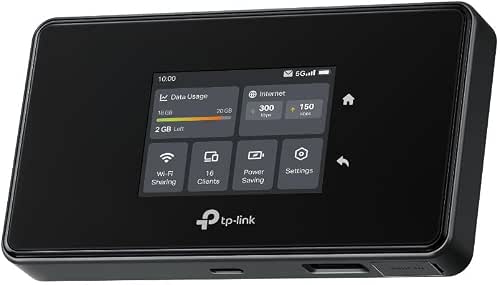
| Best Connectivity Hub | Portability: Mobile hotspot pocketable design | Wireless Connectivity: 5G cellular + Wi‑Fi (acts as hotspot) | Remote/Voice Control: Managed via app (Tether) — remote management | VIEW LATEST PRICE | Read Our Analysis |
| Roku Streaming Stick HD (2025) with Voice Remote |

| Best Travel-Friendly | Portability: Sleek streaming stick; designed for travel | Wireless Connectivity: Wi‑Fi streaming | Remote/Voice Control: Voice remote with TV power/volume | VIEW LATEST PRICE | Read Our Analysis |
More Details on Our Top Picks
Roku Streaming Stick 4K with Voice Remote
If you want a travel streamer that fits in your pocket and still delivers sharp 4K video, the Roku Streaming Stick 4K with Voice Remote is a smart pick. You’ll enjoy stunning 4K, Dolby Vision, and HDR10 for lifelike color. The long range Wi‑Fi keeps streams steady even in rooms farther from the router, and the compact HDMI stick hides behind the TV without blocking ports. You control power, volume, and streaming with one remote, and you can use voice commands to find shows fast. You get America’s top streaming platform, 500 plus free live channels, and lots of free movies.
- Portability:Compact HDMI stick; travel-friendly
- Wireless Connectivity:Wi‑Fi (long‑range receiver)
- Remote/Voice Control:Voice remote with TV power/volume
- Easy Setup:Plug into HDMI; quick setup
- Access to Streaming/Content:Roku platform — apps, free live TV, movies
- Compact Power/Power Options:Powered via TV USB or external power (compact)
- Additional Feature:Dolby Vision support
- Additional Feature:Long-range Wi‑Fi receiver
- Additional Feature:Portable HDMI stick
Roku Express HD Streaming Device with Standard Remote
You’ll like the Roku Express HD when you want straightforward streaming on the road without fuss, because it’s built for travelers who want simple, reliable HD playback in hotel rooms or rentals. You plug it into the TV, follow a quick guided setup, and connect to Wi Fi. The small player gives fast, seamless HD performance that new users find friendly and experienced streamers appreciate for its stability. The standard remote keeps things simple since it lacks TV control buttons. You get access to free, live, and premium channels, over 400 free live options, and automatic updates.
- Portability:Small set-top device; easy to move
- Wireless Connectivity:Wi‑Fi streaming (connects to internet)
- Remote/Voice Control:Standard remote (no TV control buttons)
- Easy Setup:Quick guided plug‑and‑play setup
- Access to Streaming/Content:Roku platform — free, live, premium channels
- Compact Power/Power Options:No external power adapter needed (self‑powered)
- Additional Feature:Quick guided setup
- Additional Feature:Automatic software updates
- Additional Feature:No external power adaptor
Amazon Fire TV Stick HD with Alexa Voice Remote
The Amazon Fire TV Stick HD with Alexa Voice Remote is ideal for travelers who want a simple, powerful way to turn any hotel or rental TV into a familiar streaming hub. You plug it into any HDMI port and you’re ready. It streams Full HD and gives you access to over 400,000 free movies and episodes plus more than 1.8 million titles across paid and free apps. You can use Alexa to find shows, check weather, play music, or control smart lights and cameras in your rental. Setup is quick, it’s small in your bag, and it just works when you need it.
- Portability:HDMI stick; portable for travel
- Wireless Connectivity:Wi‑Fi streaming (plugs into TV)
- Remote/Voice Control:Alexa Voice Remote (voice search/control)
- Easy Setup:Plugs into HDMI for easy setup
- Access to Streaming/Content:Amazon Fire OS — apps, free & paid content
- Compact Power/Power Options:Powered from TV HDMI power (compact)
- Additional Feature:Alexa smart‑home control
- Additional Feature:Access to 1.8M titles
- Additional Feature:Wide app ecosystem
TP-Link M8550 5G Wi‑Fi 6E Mobile Hotspot
When you need a reliable way to keep a whole group streaming on the road, the TP-Link M8550 shines as a travel hotspot that won’t hold you back. You’ll get 5G speeds via a Nano SIM and tri-band Wi‑Fi 6E, so multiple devices can stream smoothly. It supports up to 32 devices, offers Ethernet mode to act as a router, and works carrier-unlocked with major US carriers and international roaming. The 4,680 mAh battery lasts up to 14 hours, and USB‑C plus antenna ports boost flexibility. Use the Tether app and WireGuard VPN for secure, simple management.
- Portability:Mobile hotspot pocketable design
- Wireless Connectivity:5G cellular + Wi‑Fi (acts as hotspot)
- Remote/Voice Control:Managed via app (Tether) — remote management
- Easy Setup:Insert Nano SIM or Ethernet mode; app setup
- Access to Streaming/Content:Enables streaming via cellular/Wi‑Fi (router)
- Compact Power/Power Options:Internal rechargeable battery (up to 14 hours)
- Additional Feature:AXE3600 tri‑band Wi‑Fi6E
- Additional Feature:Built‑in WireGuard VPN
- Additional Feature:14‑hour rechargeable battery
Roku Streaming Stick HD (2025) with Voice Remote
If you want a simple, no-fuss way to bring your favorite shows on the road, the Roku Streaming Stick HD (2025) with Voice Remote fits the bill. You plug it into any TV HDMI and power from the TV USB, so you avoid messy cords and hunting for outlets. The sleek stick hides behind the set and won’t block nearby ports. You’ll find thousands of movies and shows, plus 500 plus free live channels for news, weather, and sports. The home screen is fast, and voice search helps you find and play quickly. The remote also controls TV power and volume.
- Portability:Sleek streaming stick; designed for travel
- Wireless Connectivity:Wi‑Fi streaming
- Remote/Voice Control:Voice remote with TV power/volume
- Easy Setup:Plug into HDMI/USB power; quick setup
- Access to Streaming/Content:Roku platform — apps, free live TV, movies
- Compact Power/Power Options:Can be powered from TV USB; no wall outlet needed
- Additional Feature:TV USB powerable
- Additional Feature:Sleek stick design
- Additional Feature:500+ free live channels
Factors to Consider When Choosing a Streaming Device for Travel
When you pick a streaming device for travel, think first about size and how easily it fits in your bag so you won’t be lugging extra weight. Also check for offline power options like USB charging or a built-in battery, and confirm the apps and services you need will work where you’re going. Pay attention to the remote and voice control ease plus Wi Fi range and connection options so you can relax and watch without fiddling at every turn.
Portability And Size
You’ll often want a streamer that tucks into a pocket or small pouch so it never becomes a hassle in your bag. Pick a compact stick or dongle shape that slides into tight spaces. Choose a lightweight unit, roughly 2 to 4 ounces, so you barely notice it in your luggage. Prefer devices that can draw power from a TV USB port to cut chargers and cords, which keeps setup simple. Check the physical size and connector orientation so the plug fits behind crowded HDMI panels without bending or blocking other ports. If you move between hotels or friends, favor a fully self-contained model with no bulky extras. These choices reduce stress, speed setup, and make travel more relaxed and joyful.
Offline Power Options
On the road and away from reliable outlets, thinking ahead about how you’ll power your streamer makes all the difference. Pick a device that runs on USB-A or USB-C so you can use power banks or a hotel TV USB port. Check the maximum power draw in watts or amps because gadgets needing more than 5V/1A may falter on small banks. Favor streamers that run from TV USB ports or from battery packs with pass-through charging since that cuts extra chargers and cords. Carry a high-capacity power bank, 10,000 to 20,000 mAh, to get several hours of viewing and to recharge accessories. Pack the right cables and a compact multiport charger that meets your device voltage and current needs.
App And Service Access
If you rely on specific apps or services while traveling, pick a device that gives you confident access without surprises. Check that it runs the streaming apps you use and that those apps work in the regions you’ll visit. Also look for voice search and universal search so you can find shows across apps without tapping through each one. Built in free channels and live TV matter if you want quick, no cost options in hotels. Make sure popular music and podcast apps are supported when you need background audio in rentals. Finally, confirm the device can install or update apps when networks are limited, or let you sign in offline when possible. These checks keep your viewing smooth and stress free.
Remote And Voice Control
When you’re packing a streaming device for a trip, the remote matters as much as the player itself because it’s the tool you’ll use every time you sit down to watch. Choose a remote that controls TV power and volume so you can manage unfamiliar hotel or rental TVs without juggling extras. Prefer voice-enabled remotes that work locally so searches and commands work even when hotel Wi‑Fi drops. Make sure the voice assistant handles universal commands and searches across apps so you spend less time tapping through menus. Look for a compact, battery-efficient design with rechargeable or easy swap batteries to avoid charging stress. Finally, confirm quick automatic pairing and support for IR plus Bluetooth or HDMI CEC for broad TV compatibility.
Connectivity And Range
You’ve picked a remote that works well with hotel TVs, and now you’ll want a streaming device that keeps a solid connection no matter where you plug in. Look for long range Wi‑Fi support or enhanced receiver sensitivity so video doesn’t stutter when the router sits down the hall. Choose dual‑band or tri‑band models that include 5 GHz or 6 GHz to avoid crowded channels and get faster, cleaner streams. Prefer devices with Ethernet or USB‑C tethering so you can plug into a wired outlet or your phone’s hotspot when Wi‑Fi is poor. Check that the device handles public hotspots and captive portals and can reauthenticate quickly. Strong antenna design or external connectors with published range figures also helps in larger rooms.
Video Quality Support
Because the TV you find in a hotel or rental can vary wildly, pick a streaming device that matches the screen and the network so you get the best picture without fuss. Check the maximum resolution it outputs so you don’t force a 4K device into a 1080p screen or lose detail on a 4K set. Also verify HDR support like Dolby Vision or HDR10 when richer color matters to you. Make sure the player handles modern codecs such as HEVC and AV1 and common frame rates including 60 fps for smooth motion. Look for automatic adjustment of resolution and bitrate so playback stays steady on slow Wi Fi. Finally confirm aspect ratio and refresh rate compatibility to avoid odd stretching or black bars.
Security And Privacy
If you want peace of mind while streaming on someone else’s TV, pick a player and habits that protect your accounts and data. Choose devices that support WireGuard or OpenVPN or let you pass a VPN through the router so public Wi‑Fi traffic stays encrypted. Prefer models with automatic firmware and security updates so weaknesses get patched without fuss. Don’t save passwords on shared TVs; sign in with app tokens, enable two‑factor authentication, and log out when you leave. Turn off automatic network joining and use only trusted hotspots or your phone’s personal hotspot to cut interception risks. Review app permissions and stop unnecessary background services. When possible use guest profiles or temporary accounts to keep your personal data separate and safe.
Frequently Asked Questions
Can These Devices Connect to Hotel Ethernet via Adapters?
Yes — many can, but it depends. You’ll tense as you try adapters; most streaming sticks and boxes work with USB-to-Ethernet or USB-C adapters, yet some hotels block devices or require MAC registration, so test before relying.
Do Streaming Devices Support Multiple User Profiles Offline?
Generally, no — most streaming devices don’t support multiple user profiles offline, because profiles usually rely on cloud accounts. You’ll need internet to switch or sync profiles, though local account workarounds vary by device and app.
How Do I Update Firmware Without Wi‑Fi?
You can update firmware without Wi‑Fi by downloading the update to a USB drive or SD card from another computer, connecting it to the device, then using the device’s local update option; follow manufacturer instructions carefully.
Are There Privacy Risks Using Public Hotspot Streaming?
Yes — you’ll face privacy risks using public hotspot streaming. Attackers can snoop unencrypted traffic, perform man‑in‑the‑middle attacks, or set up malicious hotspots. Use a VPN, HTTPS, and avoid sensitive logins to stay safer.
Can I Sideload Apps That Aren’T in the Device Store?
Yes — you can sideload apps, though some devices block it. You’ll need developer options or ADB, allow unknown sources, and verify APKs to avoid malware; keep backups and use a VPN on public hotspots for safety.