

You want fast, private hotel Wi‑Fi that’s easy to carry and power, so pick a travel router that fits your gear and comfort level. Consider the TP‑Link AX1500 for pocketable Wi‑Fi 6 and power‑bank use, the TL‑WR3002X for AX3000 speeds and 2.5 G WAN, GL.iNet Mango for ultra‑light OpenWrt privacy, Beryl AX for dual‑band Wi‑Fi 6 and WireGuard, and Opal for simple dual‑band Gigabit ports; keep VPN, USB‑C power, and at least one Gigabit WAN in mind to stay secure and connected, and if you want specific setup tips you’ll find more ahead.
| TP-Link AX1500 Ultra-Portable Travel Wi‑Fi 6 Router |

| Pocket-Friendly Pick | Wi‑Fi Bands: Dual‑band (2.4 GHz + 5 GHz, Wi‑Fi 6) | VPN Support: Not specified (no built‑in VPN mentioned) | USB Storage Sharing: USB port for external hard disk file sharing | VIEW LATEST PRICE | Read Our Analysis |
| TP-Link TL-WR3002X Wi‑Fi 6 AX3000 Travel Router |

| Performance Powerhouse | Wi‑Fi Bands: Dual‑band (2.4 GHz + 5 GHz, Wi‑Fi 6) | VPN Support: Client & server support (OpenVPN, WireGuard, PPTP, L2TP) | USB Storage Sharing: USB 3.0 port for external drives; microSD support | VIEW LATEST PRICE | Read Our Analysis |
| GL.iNet Mango GL-MT300N-V2 Portable Mini Travel Router |
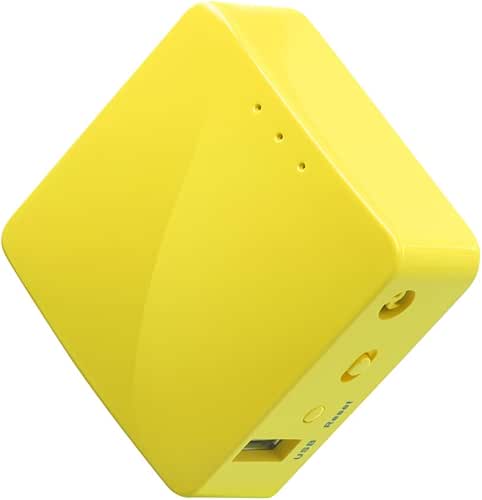
| Open-Source Mini | Wi‑Fi Bands: Single‑band (2.4 GHz only) | VPN Support: OpenVPN client pre‑installed; OpenWrt for further VPNs | USB Storage Sharing: USB 2.0 with USB disk support | VIEW LATEST PRICE | Read Our Analysis |
| GL.iNet Beryl AX GL-MT3000 Travel Wi‑Fi 6 Router |

| VPN & Privacy Pro | Wi‑Fi Bands: Dual‑band (2.4 GHz + 5 GHz, Wi‑Fi 6) | VPN Support: OpenVPN & WireGuard pre‑installed (can run client/server) | USB Storage Sharing: USB 3.0 port | VIEW LATEST PRICE | Read Our Analysis |
| GL.iNet GL-SFT1200 Opal Portable Travel Wi-Fi Router |

| Balanced All-Rounder | Wi‑Fi Bands: Dual‑band (2.4 GHz + 5 GHz, AC1200) | VPN Support: OpenVPN & WireGuard pre‑installed | USB Storage Sharing: USB (storage support) and physical toggle for VPNs | VIEW LATEST PRICE | Read Our Analysis |
More Details on Our Top Picks
TP-Link AX1500 Ultra-Portable Travel Wi‑Fi 6 Router
If you travel a lot and want fast, reliable hotel WiFi without fuss, the TP‑Link AX1500 is made to fit your bag and your routine. You’ll get WiFi 6 speeds that handle streaming, downloads, and gaming, with 1201 Mbps on 5 GHz and 300 Mbps on 2.4 GHz. It’s pocket sized and sturdy, powered by Type C and works with 9V or 12V PD or QC power banks. You can switch modes to router, access point, extender, hotspot, client, or use a 3G4G USB modem. Use USB for file sharing or phone tethering, and manage it all with the Tether App.
- Wi‑Fi Bands:Dual‑band (2.4 GHz + 5 GHz, Wi‑Fi 6)
- VPN Support:Not specified (no built‑in VPN mentioned)
- USB Storage Sharing:USB port for external hard disk file sharing
- Travel‑Focused / Pocket Size:Ultra‑portable, pocket‑sized travel router (compact dims)
- Power via USB‑C / USB Power:Type‑C power interface; works with 9V/12V PD/QC power banks
- Multiple Operation Modes:Router, AP, Range Extender, Hotspot, Client, 3/4G Modem Mode
- Additional Feature:Captive portal conversion
- Additional Feature:USB phone tethering
- Additional Feature:Type‑C PD/QC compatible
TP-Link TL-WR3002X Wi‑Fi 6 AX3000 Travel Router
You’ll like the TP‑Link TL‑WR3002X if you need fast, reliable Wi‑Fi when you travel and want simple setup that just works. This AX3000 travel router gives up to 2402 Mbps on 5 GHz and 574 Mbps on 2.4 GHz, and it handles up to 80 devices, so your gadgets stay happy. It has a 2.5 Gbps WAN/LAN port, a 1 Gbps LAN port, USB 3.0 and microSD storage, and USB‑C power that works with power banks. Use router, hotspot, AP or repeater modes. You get WireGuard and OpenVPN, captive portal sign‑on via the Tether App, and easy file sharing.
- Wi‑Fi Bands:Dual‑band (2.4 GHz + 5 GHz, Wi‑Fi 6)
- VPN Support:Client & server support (OpenVPN, WireGuard, PPTP, L2TP)
- USB Storage Sharing:USB 3.0 port for external drives; microSD support
- Travel‑Focused / Pocket Size:Pocket‑sized, travel‑focused design
- Power via USB‑C / USB Power:USB‑C power input; compatible with 5V PD power banks
- Multiple Operation Modes:Router, Hotspot, AP, RE (extend), Ethernet/USB tethering
- Additional Feature:2.5 Gbps WAN/LAN port
- Additional Feature:USB 3.0 + microSD
- Additional Feature:WireGuard/OpenVPN support
GL.iNet Mango GL-MT300N-V2 Portable Mini Travel Router
Lightweight and easy to tuck into a pocket, the GL.iNet Mango GL-MT300N-V2 is perfect for travelers who want simple, reliable privacy on hotel WiFi. You plug it into Ethernet or join a public network, and it makes a private 2.4 GHz WiFi hotspot for your devices. It weighs 39 g and fits tiny luggage, so you won’t notice it. It runs OpenWrt with 128 MB RAM and OpenVPN ready, so you can pick a VPN provider and stay protected. You’ll power it by USB from a laptop or power bank. It includes cables, a manual, and a two year warranty.
- Wi‑Fi Bands:Single‑band (2.4 GHz only)
- VPN Support:OpenVPN client pre‑installed; OpenWrt for further VPNs
- USB Storage Sharing:USB 2.0 with USB disk support
- Travel‑Focused / Pocket Size:Extremely pocket friendly (39 g, very small)
- Power via USB‑C / USB Power:Powered via USB (laptop, power bank) — USB 2.0 cable
- Multiple Operation Modes:Router, repeater (client), tethering, convert wired/wireless to private Wi‑Fi
- Additional Feature:Ultra‑light 39 g weight
- Additional Feature:OpenWrt pre‑installed
- Additional Feature:UART/GPIO hardware DIY
GL.iNet Beryl AX GL-MT3000 Travel Wi‑Fi 6 Router
For frequent travelers who need fast, secure connections in hotel rooms, the GL.iNet Beryl AX GL-MT3000 stands out by offering Wi‑Fi 6 speeds and a 2.5G multi-gig WAN port in a pocket-sized package you can tuck into your carry-on. You’ll get dual-band Wi‑Fi 6 with strong throughput, a gigabit LAN, and USB 3.0 for file sharing. It runs OpenWrt and lets you customize with thousands of plug-ins via a no-code panel. You can run WireGuard and OpenVPN together for flexible privacy and remote access. WPA3, encrypted DNS, and IPv6 keep connections safer while you travel.
- Wi‑Fi Bands:Dual‑band (2.4 GHz + 5 GHz, Wi‑Fi 6)
- VPN Support:OpenVPN & WireGuard pre‑installed (can run client/server)
- USB Storage Sharing:USB 3.0 port
- Travel‑Focused / Pocket Size:Compact, travel‑friendly pocket form factor
- Power via USB‑C / USB Power:USB‑C (implied modern power; includes plug options)
- Multiple Operation Modes:Router (travel usecases), AP/RE capabilities; VPN client/server modes
- Additional Feature:VPN cascading capable
- Additional Feature:5,000+ OpenWrt plug‑ins
- Additional Feature:WPA3 + encrypted DNS
GL.iNet GL-SFT1200 Opal Portable Travel Wi-Fi Router
If you travel for work or pleasure and want reliable, private hotel Wi Fi, the GL.iNet GL-SFT1200 Opal is a smart little companion that fits in your pocket and plugs into your routine. You’ll get AC1200 dual band speeds for light tasks on 2.4 GHz and heavier streaming or gaming on 5 GHz. It has two Gigabit LAN ports and one Gigabit WAN so you can wire devices directly. OpenVPN and WireGuard come preinstalled and a physical toggle lets you enable clients after setup. Retractable antennas boost reception. Expect to reconnect at some public hotspots and follow the setup guide.
- Wi‑Fi Bands:Dual‑band (2.4 GHz + 5 GHz, AC1200)
- VPN Support:OpenVPN & WireGuard pre‑installed
- USB Storage Sharing:USB (storage support) and physical toggle for VPNs
- Travel‑Focused / Pocket Size:Pocket‑friendly, lightweight (145 g) with retractable antennas
- Power via USB‑C / USB Power:Powered via standard DC/USB methods (portable); uses common power sources
- Multiple Operation Modes:Router, repeater/convert public wired/wireless to private Wi‑Fi, tethering
- Additional Feature:Retractable antennas
- Additional Feature:Full gigabit ports
- Additional Feature:Physical VPN toggle switch
Factors to Consider When Choosing a Travel Router for Hotel Wifi
When you pick a travel router for hotel WiFi, focus on the real-world needs that matter most: speed and bandwidth, strong security and privacy, portability and power, multi-device support, and VPN compatibility. Think about how many people and devices you’ll connect, whether you need fast streaming or just email, and if you want built-in VPN protocols for safer browsing. As you weigh those factors, I’ll guide you through practical tradeoffs and simple tips so you can choose a router that fits your travel style without fuss.
Speed And Bandwidth
Because hotel connections can change from one night to the next, you’ll want a travel router that gives you real speed and enough bandwidth for everything you do. Check the wireless standard first, since Wi‑Fi 6 will handle more devices and offer higher throughput than Wi‑Fi 5. Compare dual‑band rated speeds so you know the combined link rates on 2.4 and 5 GHz and can match them to your needs like video calls or 4K streaming. Look for gigabit or multi‑gig WAN and LAN ports if you plug into hotel Ethernet or a fast hotspot. Think about concurrent clients because each extra device reduces per‑device bandwidth. Finally, expect lower real world throughput and allow a margin of 30 to 60 percent of the theoretical maximum.
Security And Privacy
Traveling means you’ll be on networks you don’t control, so you need a travel router that locks down your devices and gives you real privacy. Pick a router that supports WPA3 or at least WPA2 so the Wi‑Fi you create resists easy cracking. Then enable a VPN like WireGuard or OpenVPN on the router to encrypt all traffic from every device. Also turn on encrypted DNS, DNS over HTTPS or DNS over TLS, so domain lookups stay private and can’t be spoofed. Isolate devices with client or AP isolation or a separate guest SSID so phones and laptops can’t see each other. Change the admin password, disable remote management, and update firmware regularly to close known holes and keep you safer on hotel networks.
Portability And Power
You’ve locked down your connection and set up a VPN, so now think about how you’ll power and carry the router itself. Choose a compact, lightweight model that slips into your pocket or fits under 200 g so it won’t add bulk to your luggage. Look at physical size and any foldable or retractable antennas to balance portability and signal when you need it. Prefer USB‑C power input and compatibility with common power banks so you can plug in anywhere. Check for low‑power modes and the ability to draw power from a laptop USB or standard power bank for long days on the road. Finally, avoid routers that require special adapters. Pick one that uses universal USB power to keep your carry simple.
Multi‑Device Support
Often you’ll find a hotel room acting like a tiny office or family hub, so plan for many devices at once. You should check the router’s concurrent device capacity or recommended client limit so everyone can connect without slowdowns. Prefer dual‑band or tri‑band models so you can spread gadgets across 2.4 GHz and 5 GHz, which cuts contention and boosts speed per device. Look for MU‑MIMO and OFDMA support because they handle many simultaneous clients more efficiently and lower latency during busy times. Also consider available wired LAN ports for a few high‑priority devices, which saves wireless bandwidth for phones and sensors. Finally verify QoS and device‑level bandwidth controls so you can prioritize important streams and limit background hogs.
VPN And Protocols
Because hotel Wi‑Fi is often shared and unpredictable, using a travel router with strong VPN and protocol support gives you real peace of mind. You should pick a router that runs WireGuard or OpenVPN clients for solid encryption and wide provider support. Make sure it can run the VPN at the router level so every device is protected without extra setup. Also check if it can act as a VPN server so you can reach your home network securely when away. Look for split tunneling or VPN cascading so you can use local printers or streaming boxes while routing internet traffic through the VPN. Verify real VPN throughput numbers, like 100 to 300 plus Mbps, and expect easy toggles in the admin interface for quick enable and disable.
Setup And Compatibility
When you plug into hotel internet, compatibility and easy setup matter more than you think, so pick a travel router that handles the hotel’s quirks without drama. Start by confirming captive portal support so the router can sign in to web‑based hotel logins. Also choose a device with multiple operation modes like router, client, access point, and repeater so you can use wired Ethernet or convert public Wi‑Fi into a private network.
Make sure it runs both 2.4 GHz and 5 GHz at the same time if you want separate guest and private SSIDs or better speed. Check power options too; USB‑C PD or 5V power bank support avoids hunting adapters. Finally pick a router with a mobile app or web admin so you can set SSID, passwords, VPN, and captive portal credentials fast on the go.
Wired Ports Availability
Pick a travel router that gives you the wired options you actually need, because a few good ports can save you a lot of hassle in a hotel. Look for at least one Gigabit Ethernet WAN port so you can plug into the room outlet or an in‑room router for a fast, stable feed. If you bring a smart TV, laptop, or game console, choose a model with an extra Gigabit LAN port or a built‑in switch so you can hardwire multiple devices without fighting Wi‑Fi. Consider a multi‑gig 2.5 Gbps port only if the hotel offers ultra‑fast lines. Also verify USB or Ethernet tethering support for USB modems and check port types and power needs, like USB‑C, so adapters and power banks will work.
Frequently Asked Questions
Can a Travel Router Bypass Hotel Login Captive Portals Automatically?
Yes—you usually can’t fully bypass captive portals automatically; you’ll need to complete the hotel’s login or use your router’s captive-portal handling (MAC cloning, DNS redirect, or remote authentication) to bridge devices through after you sign in.
Do Travel Routers Support Wired Ethernet-Only Hotel Rooms?
Yes — you can use a travel router in wired ethernet-only hotel rooms: you’ll connect the hotel’s Ethernet to the router’s WAN/LAN port, configure bridge or router mode as needed, and then share wired internet over Wi‑Fi locally.
How Do Travel Routers Handle Multiple Guests Simultaneously?
They let multiple guests connect by creating a shared Wi‑Fi network or separate guest SSIDs, routing traffic and managing bandwidth; you’ll set NAT, DHCP, and sometimes QoS to isolate devices, limit speeds, and keep connections stable.
Can Travel Routers Improve Streaming on Slow Hotel Connections?
Yes — you can boost streaming on slow hotel connections by using a travel router to create a private LAN, prioritize streaming with QoS, cache or compress data, and offload multiple devices so bandwidth’s used more efficiently for playback.
Are Travel Routers Legal to Use in All Countries?
Not always — you’ll find travel routers legal in many countries, but some restrict or require certification, and a few ban certain frequencies or tethering. Check local regulations and hotel policies before using one to avoid fines or confiscation.